

UnblurPhoto
Try free local photo enhancement in your browser, compare the result and download it; optional Cloud deblurring uses paid credits.
Page reachable · Last checked: 2026-11-15 · Hands-on check
About UnblurPhoto
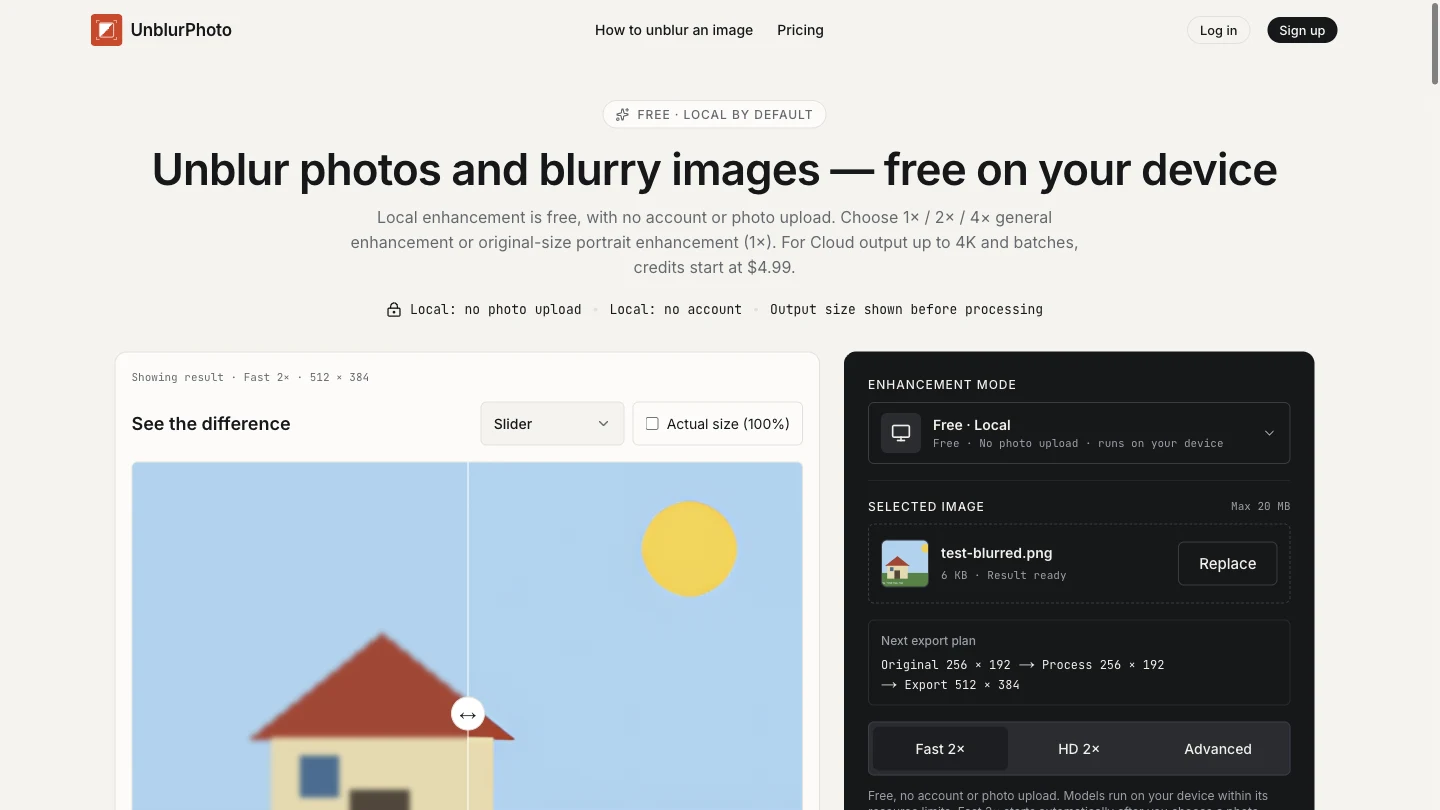
UnblurPhoto is an online photo deblurring and image enhancement tool with separate Local and Cloud workflows. It is designed for soft, small or compressed images, with a comparison viewer and downloadable results. The interface lists JPG, PNG and WebP input up to 20 MB. Local offers Fast 2×, HD 2× and Advanced controls. The provider describes general enhancement at 1×, 2× or 4× and portrait enhancement at original size. WebGPU is used when available, with a CPU fallback. Models download on demand, and device memory can limit the working image size. A 2× or 4× result scales that working image, which may already be smaller than the original. We tested Free Local Fast 2× using a self-created 256×192 illustration with mild blur. Processing completed automatically, the before/after viewer appeared, and we downloaded a 512×384 PNG without signing in or paying. This verifies a basic export workflow; it does not measure photographic quality, face recovery or difficult blur. Cloud is a separate paid route with clear enhancement, face enhancement and motion deblur controls. Published options include output up to a 4096-pixel long edge and batches of up to 15 photos, subject to limits and credits. We inspected those controls but did not submit a Cloud job. The homepage comparison samples are explicitly labelled Cloud results, so they should not be read as examples of the free Local output. The privacy policy says Local enhancement does not upload the photo, while Cloud requires an account and uploads the original for provider processing. The website still downloads software and makes other service requests. We did not audit outbound traffic or independently verify retention. Keep the original: enhanced textures, text and faces may be estimated, and a larger image is not proof of recovered authentic detail.
Why we list it
Included after a successful Local Fast 2× processing and PNG-download test. The listing separates tested export behaviour, official privacy and pricing statements, and untested Cloud and photographic quality claims.
Who it’s for
People comparing basic enhancement for small or mildly soft images, creators cleaning up compressed visuals, and users interested in the provider’s local processing route. Real photographs and portraits were not tested.
Availability & access
- Account
- No account required
- Download
- No download required
- Browser use
- Works in a browser
The tested Local Fast 2× processing and PNG download needed no login, app installation or payment. Local models/runtime download on demand; “no download” here means no installed app. The provider says Local has no daily quota or watermark and keeps photos on-device; outbound traffic was not audited. Cloud requires an account, purchased credits and an original-image upload. Published costs are 1 / 2 / 3 credits per delivered 1K / 2K / 4K result, referring to long-edge pixels. Packs start at $4.99 for 40 credits, valid 12 months; monthly plans start at $9.90 for 120 credits with no rollover. The provider gives Cloud downloads a 24-hour window, separate from cleanup and third-party retention. No Cloud job, subscription or payment was tested.
What we found
A free browser workflow sits alongside a visibly separate paid Cloud route, with working/export dimensions shown before processing. Cloud demonstration images are labelled separately from Local output.
On November 15, 2026, selected a self-created mildly blurred 256×192 PNG in Free Local Fast 2×, observed automatic processing and the before/after comparison, and downloaded a 512×384 PNG without login, installation or payment. Inspected Cloud controls without starting a job. This was a synthetic illustration, not a real photograph or portrait. HD, Advanced, 4×, Cloud results, paid plans and mobile operation were not tested; network traffic and the WebGPU/CPU execution path were not audited.
How to use UnblurPhoto
- 1Open the tool and confirm Free · Local or Cloud. The tested free workflow required no account.
- 2Choose an image. Fast 2× starts automatically unless a smaller working size needs review; HD and Advanced are started manually.
- 3Check the planned processing and export dimensions, then compare the result with the original.
- 4Download the result if suitable. Cloud requires a separate account and credits and uploads the original when a job is submitted.
Key features
- Free Local Fast 2×, HD 2× and Advanced modes; Fast 2× processing and PNG download were tested.
- Provider-listed JPG, PNG and WebP input up to 20 MB; our test covered a small PNG only.
- Before/after slider and output-dimension preview; observed in the Local test.
- Provider-described local general enhancement at 1× / 2× / 4× and portrait at original size (1×).
- On-demand local models with WebGPU support and CPU fallback, according to the provider.
- Paid Cloud controls for clear enhancement, face enhancement and motion deblur; processing not tested.
- Published Cloud output sizes of 1K, 2K and 4K, plus batches up to 15 photos / 200 MB; availability and credits apply.
Pros & cons
Pros
- +Local Fast 2× produced a downloadable 512×384 PNG from our 256×192 test image without an account or payment.
- +The comparison viewer and planned output dimensions make it possible to inspect the result before keeping it.
- +Free Local and paid Cloud controls are visibly distinguished.
Cons
- −The test used a synthetic illustration; real photos, portraits, HD, Advanced, 4× and Cloud processing were not validated.
- −Models need downloading, and local processing is constrained by browser, device memory and working image size.
- −Enhancement can invent detail; no-upload behaviour, processing backend and provider retention were not independently audited.
FAQ
What does UnblurPhoto do?
It offers photo deblurring and image enhancement through Local and optional Cloud workflows. We tested Local Fast 2× with a synthetic 256×192 PNG and downloaded a 512×384 PNG; real-photo quality was not evaluated.
Is UnblurPhoto free?
The provider lists Local processing as free without an account, watermark or daily quota. Cloud uses purchased credits, starting at $4.99 for 40 credits or $9.90/month for 120 credits as checked November 15, 2026. We tested free Local export, not paid plans.
Does it upload my photo?
The privacy policy says Local enhancement keeps the photo in the browser, while Cloud uploads the original after a job is submitted and requires an account. Models and runtime still download for Local. We did not independently audit network traffic or provider retention.
Which inputs and output sizes are supported?
The public interface lists JPG, PNG and WebP up to 20 MB. Local general modes offer 1× / 2× / 4× of the working image, while portrait mode stays at original size. Cloud 1K / 2K / 4K refers to the output long edge. Our test covered only small PNG input and 2× PNG output.
Does it support face and motion deblurring?
Cloud controls include face enhancement and motion deblur, with paid credits. Local also lists original-size portrait enhancement. We inspected Cloud controls but did not run those modes, so their quality or success rate has not been verified.
Are homepage samples examples of free Local results?
The homepage labels its comparison pairs as results from the current Cloud models. They should not be used as proof of free Local performance. Try an image you are authorised to use and compare the actual Local result.
Can it reliably recover severely blurred details?
No reliable recovery was established by our test. The provider warns that enhancement may estimate textures or facial features rather than recover the exact original. Keep the source image and do not treat enhanced details as proof of identity or an authentic event.
Similar apps
Separate products in the same categories, selected by SoFast.

Remove an image background in your browser, compare the cutout and download a transparent PNG; preview colours do not flatten the main export.
Also in Creative Media
Upload an image, select a colour and view the tool’s closest RAL reference with a code, name and RGB values.
Also in Creative Media

Create AI videos and images for YouTube Shorts, UGC-style ads and social content in one browser workspace.
Also in Creative Media
An official movie website for The Dresden Sun with film information, trailer, watch links, music, merch, and audience updates.
Also in Creative Media
Sources
- unblurphoto.io · Observed 2026-11-15
- unblurphoto.io · Observed 2026-11-15
- unblurphoto.io · Observed 2026-11-15
SoFast is an independent directory. Product information is based on publicly available information and may change. Each product is operated by its respective owner. Visit the original website for the latest details.