

BG Remove Pro
Remove an image background in your browser, compare the cutout and download a transparent PNG; preview colours do not flatten the main export.
Page reachable · Last checked: 2026-11-15 · Hands-on check
About BG Remove Pro
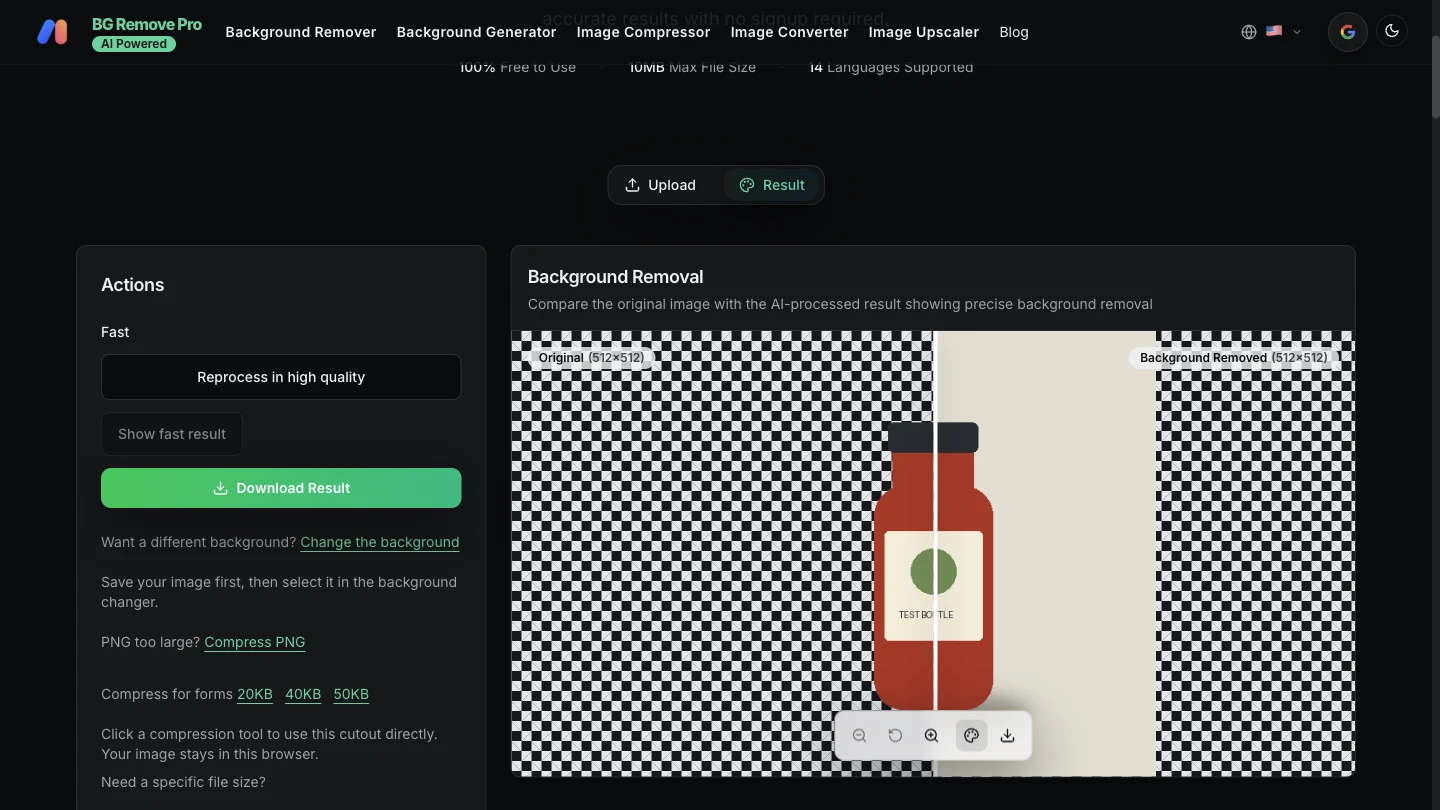
BG Remove Pro’s homepage is an AI background remover for making transparent image cutouts. Select an image, run the removal step, inspect the comparison and download a PNG for use in another design. It can be a starting point for product photography layouts, slides or social graphics; it does not turn a raster image into vector artwork. The homepage describes its background-removal workflow as free without an account, watermark, per-image fee or daily quota. It lists JPG/JPEG, PNG, WebP, GIF and BMP inputs up to 10 MB and says HEIC is unsupported. Published instructions describe processing one image at a time. We tested one small PNG rather than establishing support for every format, file-size boundary or batch workflow. Our test used a self-drawn 512×512 bottle illustration on a neutral background. Processing produced a downloadable 512×512 RGBA PNG with both transparent and opaque areas. No login, installation or payment was required. This establishes a basic cutout export, not a benchmark of real product photos, portraits, hair, glass or difficult edges. Background Settings changes the comparison preview. We selected White and downloaded through the main Download Result button again: the file still contained transparency, and its pixels matched the initial export. To make a finished white-background image, place the PNG on a white layer in an editor. Other controls, including comparison downloads and high-quality reprocessing, were not tested. The provider says homepage background removal runs locally using a browser worker and WebAssembly; the application and model still need downloading. We did not audit network traffic. Its broader privacy policy describes analytics and advertising, and distinguishes an image converter that sends files to the server. Do not extend the homepage’s local-processing statement to every tool on the site. Inspect the actual download, keep the original and review edges before relying on the result.
Why we list it
Included after processing a self-created PNG and verifying the download’s dimensions and alpha channel, plus a second export after a white preview. Local-processing and unlimited/no-watermark statements remain attributed to the homepage rather than treated as a complete privacy or quality audit.
Who it’s for
Creators, online sellers and designers preparing raster cutouts for layouts, presentations or social graphics. Our functional test used a synthetic bottle; real product photos, portraits and official-document photo requirements were not validated.
Availability & access
- Account
- No account required
- Download
- No download required
- Browser use
- Works in a browser
Homepage processing and two main PNG downloads worked in a desktop browser without login, an installed app or payment. The site lists a 10 MB input limit and describes one-image-at-a-time use, no watermark and no daily quota; only a small single PNG was tested. Model/application downloads are still required. The homepage says background removal runs locally, but we did not inspect outbound traffic or audit privacy. The broader site policy describes analytics/advertising and an image-converter route that sends files to the server. Optional Google sign-in and other image tools have separate conditions; those routes were not tested. Preview background colours are not baked into the main PNG download.
What we found
The homepage combines free no-account removal with a comparison preview and transparent export. Its colour controls are explicitly preview-only; we confirmed the main PNG stayed transparent after choosing White.
On November 15, 2026, selected one self-drawn 512×512 bottle PNG in the homepage background remover, started processing and downloaded a 512×512 RGBA PNG containing both transparent and opaque pixels. Selected White in Background Settings and downloaded again: the main export remained transparent, with RGBA pixels identical to the first export. Restored the transparent preview. No login, installed app or payment was needed. This was a small illustration, not a real photo or portrait. Other formats, maximum size, multi-file processing, high-quality mode, mobile, other site tools and network/privacy behaviour were not tested.
How to use BG Remove Pro
- 1Select an image in the homepage uploader. The published format and file-size limits apply.
- 2Start Remove Background and allow time for the model and image processing; keep the tab open.
- 3Inspect the comparison and use background previews to check edges. Preview colour is separate from the main transparent export.
- 4Use Download Result to save the cutout. Check the PNG’s edges and dimensions in your intended editor.
- 5For a flattened white or coloured image, place the transparent PNG over a background layer and export in an image editor.
Key features
- Homepage background removal with a before/after comparison; one PNG was processed successfully.
- Transparent PNG main export at the source dimensions in our 512×512 test.
- Background Settings previews, including White; main export remained transparent in the test.
- Provider-listed JPG/JPEG, PNG, WebP, GIF and BMP input up to 10 MB; only small PNG input was tested.
- Homepage terms describe free, no-account, no-watermark processing without a daily quota; exhaustive use was not tested.
- Provider-described local browser-worker/WebAssembly processing, distinct from other same-site tools; no network audit.
- Links to other image utilities and a high-quality reprocess control are present; those workflows were not tested.
Pros & cons
Pros
- +The tested homepage processing and main PNG downloads worked without login, installation or payment.
- +The cutout kept the 512×512 source dimensions and contained transparent as well as opaque pixels.
- +Choosing White for the preview did not flatten or change the main PNG export in our test.
Cons
- −Only a small synthetic PNG was tested; real photos, detailed edges, other input formats, high-quality mode and mobile operation were not validated.
- −The main export is transparent rather than a finished white-background image; further composition may be needed.
- −The provider’s local-processing statement is scoped to this workflow; analytics, other tools and network behaviour were not independently audited.
FAQ
Is BG Remove Pro free and do I need an account?
The homepage describes background removal as free, without signup, a watermark or a daily quota. Our single PNG processing and downloads needed no account, installation or payment. This does not establish the conditions of every same-site tool or unlimited device resources.
Are photos processed locally?
The homepage says its background-removal model runs in the browser using a worker and WebAssembly. The site and model still download, and its policy describes analytics and other server-based tools. We did not audit network traffic, so this is a workflow-specific provider claim.
Which files can I use?
Published homepage instructions list JPG/JPEG, PNG, WebP, GIF and BMP up to 10 MB and exclude HEIC. We tested only a small 512×512 PNG, not other formats or the maximum limit.
What file did the tool export in the test?
The main Download Result action saved a 512×512 RGBA PNG from our 512×512 bottle illustration, with transparent and opaque pixels. This confirms the basic export and dimensions, not perfect edges for every photograph.
Can I download a white-background image using the preview colour?
In our test, selecting White in Background Settings did not change the main PNG: it stayed transparent and its pixels matched the first export. Place the PNG over a white layer in an editor to create a flattened white-background image. Comparison downloads were not tested.
Does it support batch processing, portraits or mobile devices?
The homepage describes one image at a time and use in modern mobile browsers. We tested one synthetic PNG in a desktop browser only. Batch behaviour, real portraits, mobile performance and high-quality reprocessing were not validated; do not infer them from this test.
Similar apps
Separate products in the same categories, selected by SoFast.
Upload an image, select a colour and view the tool’s closest RAL reference with a code, name and RGB values.
Also in Creative Media

Create AI videos and images for YouTube Shorts, UGC-style ads and social content in one browser workspace.
Also in Creative Media
An official movie website for The Dresden Sun with film information, trailer, watch links, music, merch, and audience updates.
Also in Creative Media
A live media creation concept for building a 24/7 TV channel or radio station and streaming video or audio content through OBS.
Also in Creative Media
Sources
- www.bgremovepro.com · Observed 2026-11-15
- www.bgremovepro.com · Observed 2026-11-15
SoFast is an independent directory. Product information is based on publicly available information and may change. Each product is operated by its respective owner. Visit the original website for the latest details.