

RVZ to ISO
Convert GameCube and Wii RVZ disc images to ISO online, with resumable uploads and paid conversion options.
Page reachable · Last checked: 2026-11-21 · Browser inspection
About RVZ to ISO
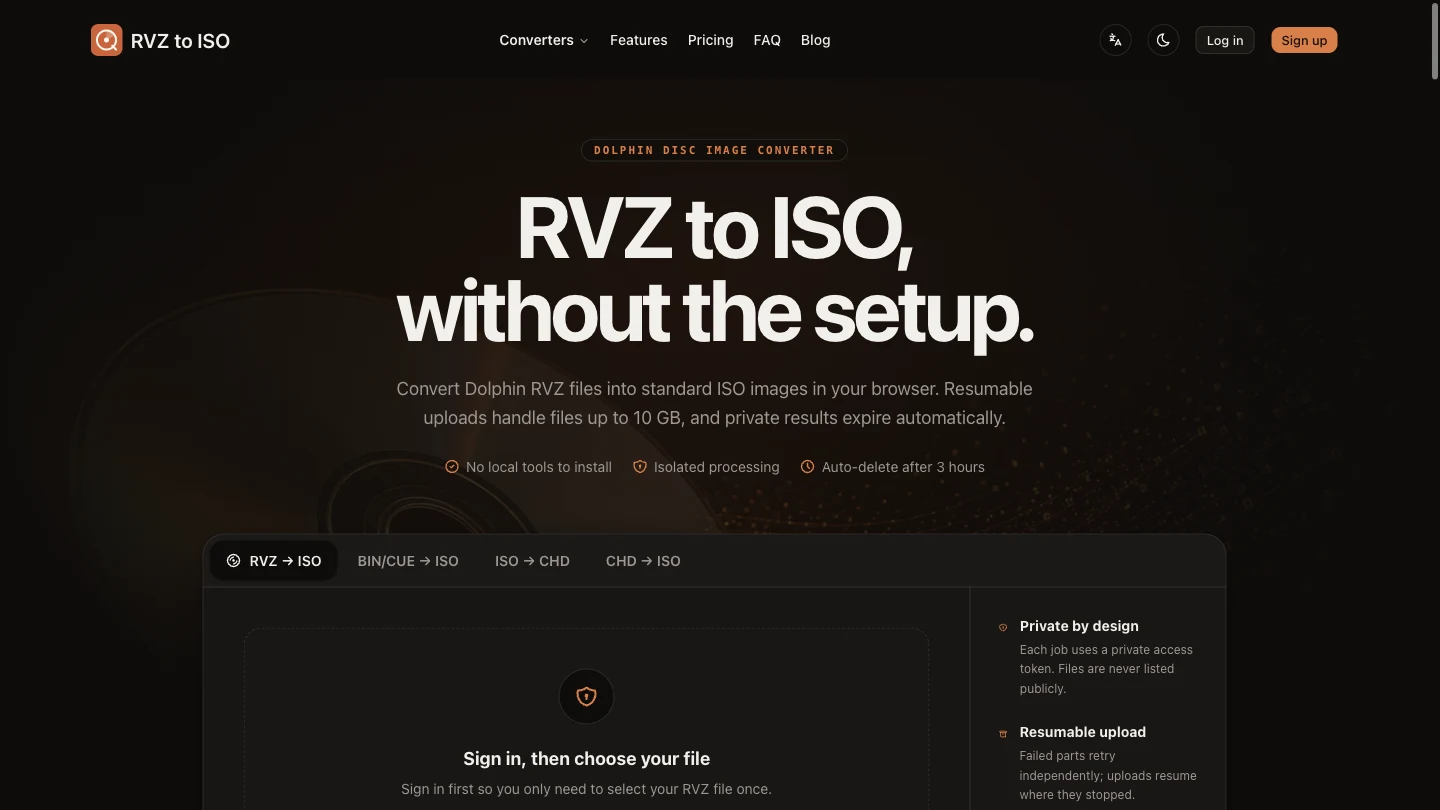
RVZ to ISO is a web-based disc-image converter for people who need a standard ISO from a compressed GameCube or Wii RVZ file. Its main use is preparing an existing disc image for a patcher or another workflow that accepts ISO but cannot read RVZ. The site is a conversion service rather than a game library: users supply their own files. The provider says the RVZ workflow accepts one file up to 10 GB, splits uploads into retryable parts, and restores the image using Dolphin's engine in an isolated server container. You operate it through a browser without installing Dolphin locally. Processing happens on the service's servers, so this is not an offline or browser-local converter. The resulting ISO may be considerably larger than its compressed source, and users still need space and bandwidth to download it. During our November 21, 2026 inspection, choosing an RVZ file required signing in first. The pricing FAQ states that RVZ jobs use 20 credits and always require a paid option; a new account's 10 free credits are enough only for a standard conversion. One-time per-file payments and non-renewing 30-day or one-year passes are advertised. The related BIN/CUE, ISO-to-CHD and CHD-to-ISO tools have separate access conditions, including free small-file conversions, which should not be mistaken for free RVZ conversion. The privacy policy describes temporary cloud storage, input deletion after successful processing and output retention for up to three hours. Anyone holding a private job token may access that job, and failed or abandoned uploads can remain until cleanup. We inspected the interface and published terms but did not sign in, upload a disc image, pay or download a converted ISO. Conversion fidelity, speed, resumability and actual deletion remain untested.
Why we list it
Included as a focused disc-image utility after inspecting the real uploader, sign-in gate, pricing FAQ and privacy policy. Its purpose is conversion rather than playing or downloading games. This record confirms the interface is reachable; it does not certify a successful conversion.
Who it’s for
GameCube and Wii disc-image users who need ISO compatibility for patching or other tools and prefer a browser-operated conversion service over installing a local converter.
Availability & access
- Account
- Account required
- Download
- No download required
- Browser use
- Works in a browser
RVZ-specific access: the uploader opens a sign-in dialog before file selection; the pricing FAQ says RVZ conversion costs 20 credits and always requires a paid option. New accounts receive 10 free credits for a standard conversion, not an RVZ job. Related standard converters advertise free files up to 200 MB; BIN/CUE supports a single data track and lists a 1.5 GB maximum. These separate workflows are not free RVZ access. On November 21, 2026, advertised pass prices were $7.49 for 30 days and $24.50 for one year during a temporary 50% Black Friday promotion; crossed-out regular prices were $14.99 and $49. Passes do not automatically renew and are subject to a stated fair-use limit of 20 conversions daily. Per-file checkout prices were not obtained. No account, upload or payment was tested. No local converter installation is needed according to the provider, but input upload and output download are required.
What we found
A focused browser interface for large RVZ uploads with server-side Dolphin restoration, alongside BIN/CUE and CHD tools. The main RVZ workflow has paid access even though some related small-file workflows are free.
On November 21, 2026, reviewed the live RVZ uploader, pricing FAQ, privacy policy and BIN/CUE converter. Clicking the RVZ file-selection area opened a sign-in dialog; the upload-and-convert button was disabled without a file. No account was created, no file was uploaded, and no payment or completed conversion was tested. File limits, restoration, resumable transfers and deletion policies are provider claims, not verified conversion results.
How to use RVZ to ISO
- 1Open the RVZ converter and sign in before selecting a file.
- 2Select an RVZ disc image you are authorized to use; the provider lists a 10 GB maximum.
- 3Review the current per-file quote, credit balance or pass terms, then start the upload and conversion.
- 4If conversion succeeds, download the ISO through the private job page before its stated three-hour expiry. This workflow is documented by the provider and was not completed in our inspection.
Key features
- RVZ-to-ISO workflow for GameCube and Wii disc images, with a stated 10 GB input limit.
- Resumable multipart uploads with independently retryable parts, according to the provider.
- Server-side restoration using Dolphin in an isolated container; no local converter installation.
- Private job-token access and temporary output links; the policy states up to three hours of output retention.
- One-time per-file payments and non-renewing passes; advertised pass fair-use limit is 20 conversions per day.
- Related BIN/CUE-to-ISO, ISO-to-CHD and CHD-to-ISO converters with separate file and access conditions.
Pros & cons
Pros
- +The interface presents file selection, format navigation and access conditions in one place.
- +The documented workflow avoids installing a local conversion tool.
- +The site publishes file-size limits, pass fair-use terms and temporary-storage conditions.
Cons
- −RVZ file selection requires an account and the pricing FAQ says RVZ conversion always needs a paid option.
- −Files are uploaded for cloud processing; this is not an offline converter.
- −Conversion accuracy, large-file transfers, download resuming and file deletion were not tested.
- −The output ISO can be much larger than the RVZ source, and the provider limits output retention to three hours.
FAQ
What does RVZ to ISO do?
It provides an online workflow for restoring a compressed GameCube or Wii RVZ disc image to ISO. The provider says it uses Dolphin in a server container. The site requires you to supply your own file; it is not a game-download library.
Is RVZ to ISO free?
The current pricing FAQ says RVZ jobs use 20 credits and always need a paid option. A new account receives 10 free credits, enough for one standard BIN/CUE, ISO or CHD conversion. Some related small-file conversions are free, which does not make the RVZ workflow free.
Do I need an account or Dolphin installed?
Clicking the RVZ file-selection area opened a sign-in dialog during our inspection. The provider says no local Dolphin installation is needed because conversion runs on its servers. We did not create an account or complete an upload.
What is the RVZ file-size limit?
The official uploader and FAQ list one RVZ file up to 10 GB with resumable multipart uploads. We did not test large files or interrupted transfers. A restored ISO can be substantially larger than the compressed input.
Are files converted locally in my browser?
No. The service describes uploading inputs to cloud storage and processing them in isolated server containers. Its privacy policy says successful inputs are deleted after processing and outputs are kept for up to three hours. Failed or abandoned uploads may await cleanup; anyone holding a private job token may access its job. These policies were not independently audited.
Which other conversions are available?
The site also presents BIN/CUE-to-ISO, ISO-to-CHD and CHD-to-ISO tools. The BIN/CUE page specifies a matching pair containing a single data track, a 1.5 GB maximum, and free conversion up to 200 MB. We inspected that page but did not test these conversions.
Has SoFast tested an actual RVZ conversion?
No. Our November 21, 2026 review covered the live uploader, the sign-in requirement, pricing and privacy information. We did not upload a disc image, pay or download an ISO, so restoration quality, speed, resumability and actual file deletion remain unverified.
Similar apps
Separate products in the same categories, selected by SoFast.

Explore Coast FIRE savings scenarios with adjustable ages, assets, spending and growth assumptions; results are estimates, not a retirement guarantee.
Also in Utilities Converters

Convert PNG, JPG and WebP images to SVG with browser-based tracing, three presets, colour editing and an optional cloud AI workflow.
Also in Utilities Converters
A Lovable-built lookup utility for Steam app IDs, depot IDs, and manifest references, tracked as a high-traffic single-purpose search tool.
Also in Utilities Converters
Convert HEX, RGB and CMYK colour codes, preview a chosen colour, and explore gradient palettes and related colour combinations.
Also in Utilities Converters
Sources
- rvztoiso.com · Observed 2026-11-21
- rvztoiso.com · Observed 2026-11-21
- rvztoiso.com · Observed 2026-11-21
- rvztoiso.com · Observed 2026-11-21
SoFast is an independent directory. Product information is based on publicly available information and may change. Each product is operated by its respective owner. Visit the original website for the latest details.