

Coast FIRE Calculator
Explore Coast FIRE savings scenarios with adjustable ages, assets, spending and growth assumptions; results are estimates, not a retirement guarantee.
Page reachable · Last checked: 2026-11-15 · Hands-on check
About Coast FIRE Calculator
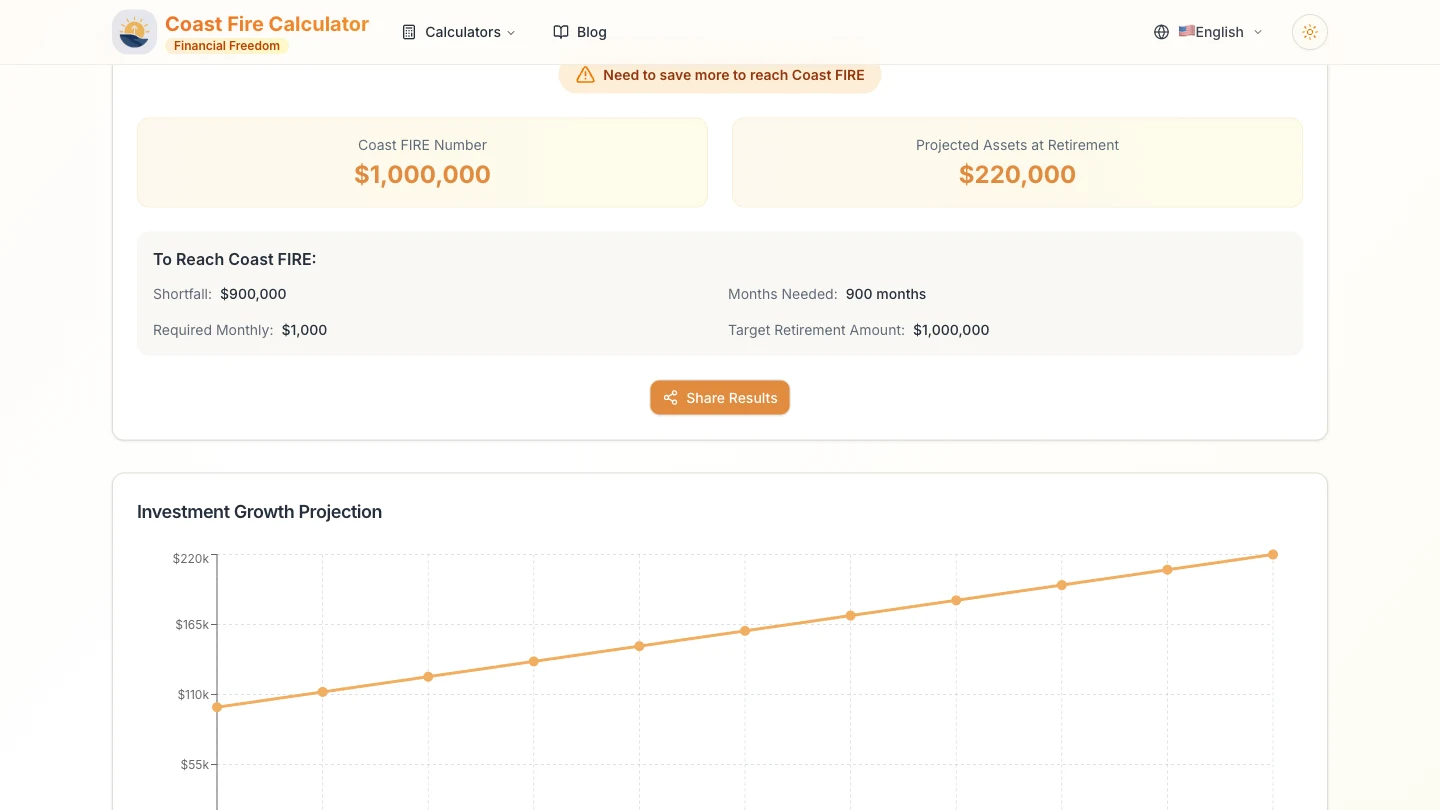
Coast FIRE Calculator is a free retirement savings calculator for exploring hypothetical financial-independence scenarios. Coast FIRE means an invested balance might grow to a future retirement target without further retirement contributions under selected assumptions. It does not establish that current living expenses are funded or that someone can immediately stop working. The main tool accepts current and retirement ages, invested assets, monthly contributions and annual retirement spending. Growth, investment fees, inflation and withdrawal rate are adjustable. Results separate the Coast FIRE number, projected retirement assets and retirement target, with a projection chart and additional savings figures. A projection that includes new contributions answers a different question from how much is needed today without future contributions. We checked three invented USD scenarios using simple zero-growth and fixed-growth assumptions. The three principal amounts matched independent arithmetic in those examples, and changing monthly contributions changed the projected balance. The screenshot uses an invented zero-growth scenario; none of the amounts or rates are recommendations, forecasts or a personal retirement plan. There is an important edge case: with zero monthly contributions, the site displayed Months Needed as 0 despite a positive $900,000 shortfall. Do not interpret that ancillary label as already reaching the target. Our checks did not validate all fee/inflation combinations, contribution guidance, market uncertainty, taxes, account access or withdrawal outcomes. The Social Security guide describes a manual adjustment: subtract expected annual benefit or pension income from spending and enter the remaining amount. It is not an automatic benefit lookup. The timing and reliability of that income still require separate consideration. The public calculator worked without signup or payment. Its policy, dated January 2024, says calculations stay in the browser and financial inputs are not collected, while mentioning usage statistics and preferences. We did not audit those claims or test sharing. Use the tool for educational comparisons, not as a complete financial plan or a guarantee of retirement readiness.
Why we list it
Included as an educational calculator after testing three invented scenarios. Principal values matched their simple reference calculations, but a zero-contribution Months Needed display was misleading if read as time to funding. The listing explicitly limits the verification and does not recommend the example rates.
Who it’s for
Individuals learning about Coast FIRE or comparing hypothetical retirement-saving assumptions. The site’s terms describe personal, non-commercial use; this listing does not establish financial suitability or replace a complete plan.
Availability & access
- Account
- No account required
- Download
- No download required
- Browser use
- Works in a browser
The main calculator worked in a desktop browser without signup, installed software or payment. Tests used invented inputs only. Terms describe educational personal, non-commercial use and no financial-advice or outcome guarantee. Other calculator variants, sharing and mobile operation were not functionally tested. The privacy policy labelled January 2024 says calculations are local and financial inputs are not collected/stored/transmitted, alongside possible usage statistics, analytics and preference storage. We did not verify network activity, storage or security. No bank or government account was connected. Test rates are arbitrary, not suggested investment returns or withdrawal rates.
What we found
The interface brings the Coast FIRE milestone, a contribution-inclusive projection and retirement target together with an interactive chart. Our record separates limited arithmetic checks from an observed ancillary-label edge case and untested financial assumptions.
On November 15, 2026, entered three invented USD scenarios in the main calculator, changing contributions and a fixed growth assumption. The Coast FIRE number, projected assets and target amount matched independent arithmetic in all three cases: zero growth with no contributions, zero growth with monthly contributions, and a fixed 10% annual-growth example with no contributions. Rates are arbitrary test inputs, not recommendations. In the zero-contribution case the site showed Months Needed as 0 despite a $900,000 shortfall. No login, installation or payment was needed. This is a limited arithmetic/UI check, not an audit of inflation/fees, all inputs, financial suitability, withdrawal success, benefit estimates, sharing, mobile or privacy.
How to use Coast FIRE Calculator
- 1Set an illustrative current age, retirement age, invested balance, contribution amount and retirement spending.
- 2Review the growth, fee, inflation and withdrawal assumptions. Keep nominal/real treatment consistent rather than assuming default rates are suitable.
- 3Compare the Coast FIRE number, target amount and projection separately. Note whether the projection includes continued contributions.
- 4Change one assumption at a time and review the chart; ancillary guidance and edge cases need additional checking.
- 5If modelling benefits, follow the guide’s manual spending adjustment and consider when the income begins. Treat results as estimates rather than a decision to stop saving or working.
Key features
- Adjustable ages, invested assets, monthly contributions and annual retirement spending.
- Separate growth, investment-fee, inflation and withdrawal-rate inputs; all combined paths were not audited.
- Coast FIRE number, projected assets and retirement target; these three amounts matched three simple test scenarios.
- Investment Growth Projection chart responds to the scenario; a zero-growth contribution example was observed.
- Additional shortfall, month and required-contribution figures are displayed; a zero-contribution Months Needed edge case was found.
- Educational Social Security/pension guide using manually adjusted spending rather than benefit lookup.
- Free public browser access without an account in the tested main workflow; Share Results was not tested.
Pros & cons
Pros
- +The main calculator responded without registration, installation or payment.
- +Three principal amounts matched independent arithmetic in the three bounded test cases.
- +Separate inputs and a chart allow visible comparison of hypothetical savings scenarios.
Cons
- −With zero contributions, Months Needed displayed 0 despite a positive shortfall; that label should not be treated as funded status.
- −Full fee/inflation treatment, required-contribution guidance and market/withdrawal risks were not independently audited.
- −The tool does not establish a complete financial plan; Social Security is entered through manual assumptions and privacy was not audited.
FAQ
What does Coast FIRE mean?
It is a scenario in which investments already set aside could grow to a later retirement target without further retirement contributions, under chosen assumptions. It does not establish that current living costs are covered or that immediate retirement is affordable.
Is the calculator free and account-free?
The public tool is described as free and without signup. Our main-calculator checks required no account, installation or payment. Terms describe educational personal, non-commercial use; other variants and sharing were not functionally tested.
Which inputs and results are available?
The main interface includes ages, invested assets, monthly contributions, retirement spending, growth, fees, inflation and withdrawal rate. It shows a Coast FIRE number, projected assets, target amount, ancillary savings guidance and a chart. These are scenario estimates.
Were the calculations independently verified?
Only three principal amounts in three simple invented scenarios were compared with independent arithmetic, and those matched. The zero-contribution Months Needed field nevertheless showed 0 with a $900,000 shortfall. This is not a full model audit or proof of retirement readiness.
Can I include Social Security or a pension?
The guide describes subtracting expected annual income from retirement spending and entering the remaining amount. It is a manual assumption, not an automatic benefit lookup or government-account connection. Timing gaps and benefit assumptions were not independently validated.
Do the displayed rates guarantee a retirement outcome?
No. Growth and withdrawal rates are assumptions, including the arbitrary rates used in our examples. Actual returns, costs, taxes and circumstances can differ. A contribution-inclusive projection also does not prove that no further contributions are needed.
Does financial data stay on my device?
The policy labelled January 2024 says calculations run locally and financial inputs are not collected or transmitted, while mentioning usage statistics and preference storage. We did not audit the implementation, network traffic, security or sharing, so this remains a provider statement.
Similar apps
Separate products in the same categories, selected by SoFast.

Convert PNG, JPG and WebP images to SVG with browser-based tracing, three presets, colour editing and an optional cloud AI workflow.
Also in Utilities Converters
A Lovable-built lookup utility for Steam app IDs, depot IDs, and manifest references, tracked as a high-traffic single-purpose search tool.
Also in Utilities Converters
Convert HEX, RGB and CMYK colour codes, preview a chosen colour, and explore gradient palettes and related colour combinations.
Also in Utilities Converters

Convert GameCube and Wii RVZ disc images to ISO online, with resumable uploads and paid conversion options.
Also in Utilities Converters
Sources
- www.coastfirecalc.org · Observed 2026-11-15
- www.coastfirecalc.org · Observed 2026-11-15
- www.coastfirecalc.org · Observed 2026-11-15
SoFast is an independent directory. Product information is based on publicly available information and may change. Each product is operated by its respective owner. Visit the original website for the latest details.