
色碼轉換器
Convert HEX, RGB and CMYK colour codes, preview a chosen colour, and explore gradient palettes and related colour combinations.
Page reachable · Last checked: 2026-11-15 · Hands-on check
About 色碼轉換器
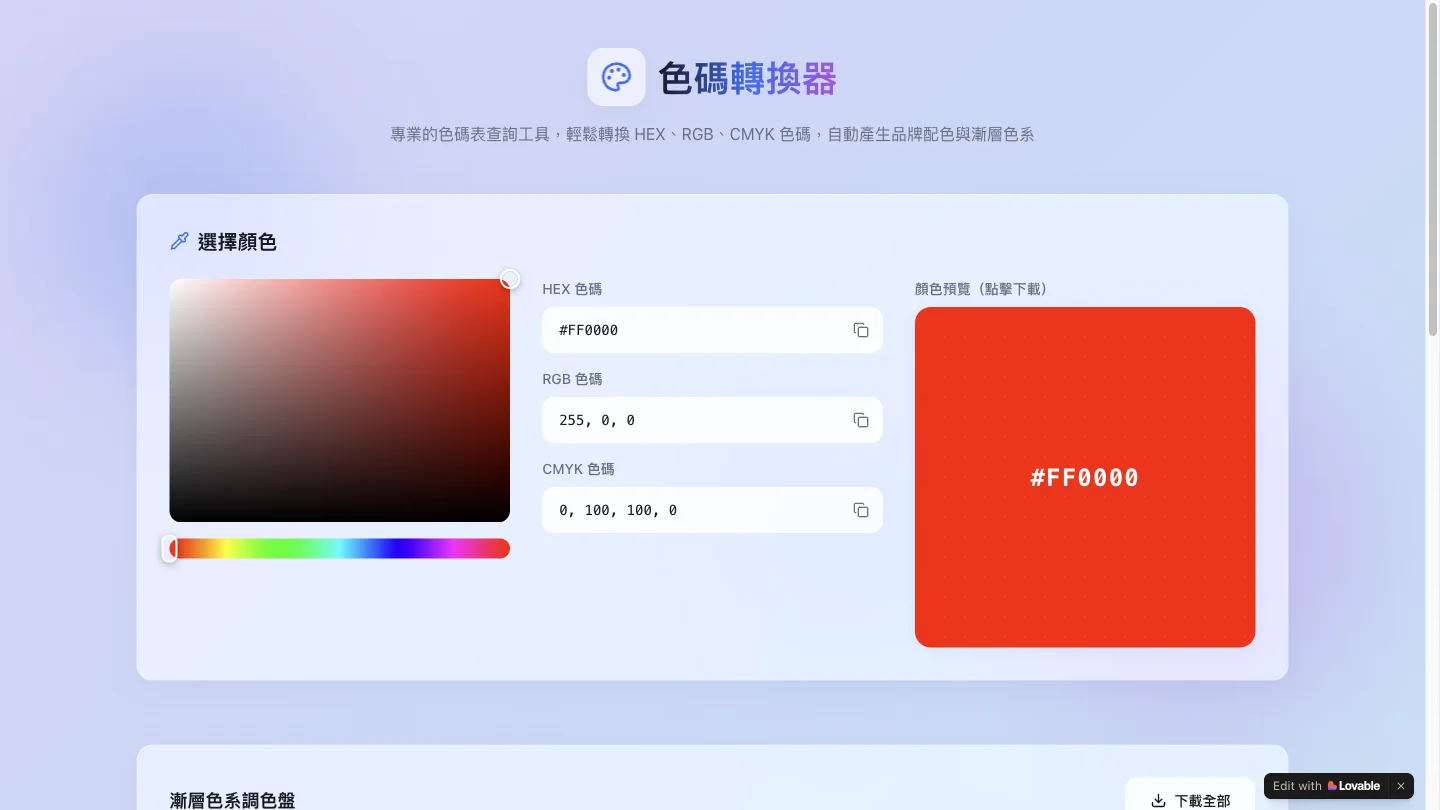
色碼轉換器 is a browser-based colour code converter with a Traditional Chinese interface. It brings HEX, RGB and CMYK values into one workspace, alongside a colour picker, a large preview and a set of related palettes. It is useful when a colour needs to move between a web mockup, a visual brief and a simple reference sheet. The main input panel lets you enter a colour code or choose a colour visually. The page also presents a twelve-step light-to-dark palette and complementary, split-complementary, triadic and analogous combinations. Copy controls sit beside values, while download controls are provided for colour images and palettes. In our desktop test, entering #FF0000 and confirming the field updated RGB to 255, 0, 0 and CMYK to 0, 100, 100, 0. The preview and related palette changed to red. This checks a simple primary-colour conversion, rather than validating every formula or input format. The tool is a good fit for designers and developers who need quick 色碼查詢 or 色碼轉換 without opening a full design application. CMYK numbers should be treated as a basic reference: a colour code alone does not establish how a colour will print with a particular profile, ink, paper or press. Palette exports and mobile behaviour were not tested.
Why we list it
Included for a working, narrowly scoped colour conversion task and a useful palette reference. A primary-red conversion was tested; print colour accuracy and downloads were not.
Who it’s for
Web designers, frontend developers and visual designers who need quick colour code lookup and palette references in a Traditional Chinese interface.
Availability & access
- Account
- No account required
- Download
- No download required
- Browser use
- Works in a browser
The official page describes the tool as free. The tested conversion ran in a desktop browser without an account, installation or payment. Download controls were inspected but exports and mobile behaviour were not tested.
What we found
Colour conversion and several related palette families share one screen, making it easy to compare a base colour with lighter, darker and contrasting options.
On November 15, 2026, entered #FF0000 in the HEX input and confirmed it with Enter. RGB changed to 255, 0, 0, CMYK to 0, 100, 100, 0, and the preview and palette changed to red. No account, installation or payment was required. Palette exports, other colour samples and mobile operation were not tested.
How to use 色碼轉換器
- 1Open the colour converter and enter a HEX, RGB or CMYK value, or choose a colour with the picker.
- 2Confirm the field and compare the other colour values and the preview. In our test, pressing Enter applied the HEX change.
- 3Review the generated palette and related colours. Check any downloaded assets before using them in a deliverable.
Key features
- HEX, RGB and CMYK input fields with a linked colour preview.
- Visual colour picker for selecting a base colour.
- Twelve-step gradient palette for lighter and darker variations.
- Complementary, split-complementary, triadic and analogous colour suggestions.
- Copy and download controls for values, colour images and palettes; exports were not tested.
Pros & cons
Pros
- +Conversion fields and palette references are available together.
- +The tested basic conversion did not require an account or installation.
Cons
- −Only a primary-red conversion was validated; exports and mobile behaviour were not tested.
- −The interface does not establish a colour-managed print workflow; CMYK output is a reference.
FAQ
What does 色碼轉換器 do?
It converts and previews HEX, RGB and CMYK colour codes and offers gradient and related colour palettes. The Traditional Chinese name means colour code converter.
Can I convert HEX to RGB and CMYK?
Yes. In our test, entering #FF0000 and confirming the field produced RGB 255, 0, 0 and CMYK 0, 100, 100, 0. This was one sample, rather than a full conversion benchmark.
Is this 色碼查詢 tool free to use?
The official page describes it as a free colour code lookup tool. Our tested conversion ran without an account, software installation or payment.
Can I rely on the CMYK result for printing?
Use it as a starting reference. We did not validate ICC profiles, ink, paper or press output. Confirm production print colours in the workflow used by your printer.
Similar apps
Separate products in the same categories, selected by SoFast.

Explore Coast FIRE savings scenarios with adjustable ages, assets, spending and growth assumptions; results are estimates, not a retirement guarantee.
Also in Utilities Converters

Convert PNG, JPG and WebP images to SVG with browser-based tracing, three presets, colour editing and an optional cloud AI workflow.
Also in Utilities Converters
A Lovable-built lookup utility for Steam app IDs, depot IDs, and manifest references, tracked as a high-traffic single-purpose search tool.
Also in Utilities Converters

Convert GameCube and Wii RVZ disc images to ISO online, with resumable uploads and paid conversion options.
Also in Utilities Converters
Sources
- colorcodes.lovable.app · Observed 2026-11-15
SoFast is an independent directory. Product information is based on publicly available information and may change. Each product is operated by its respective owner. Visit the original website for the latest details.