

Nano Banana Prompts
Copyable Nano Banana prompts with visual examples
Page reachable · Last checked: 2026-11-24 · Hands-on check
About Nano Banana Prompts
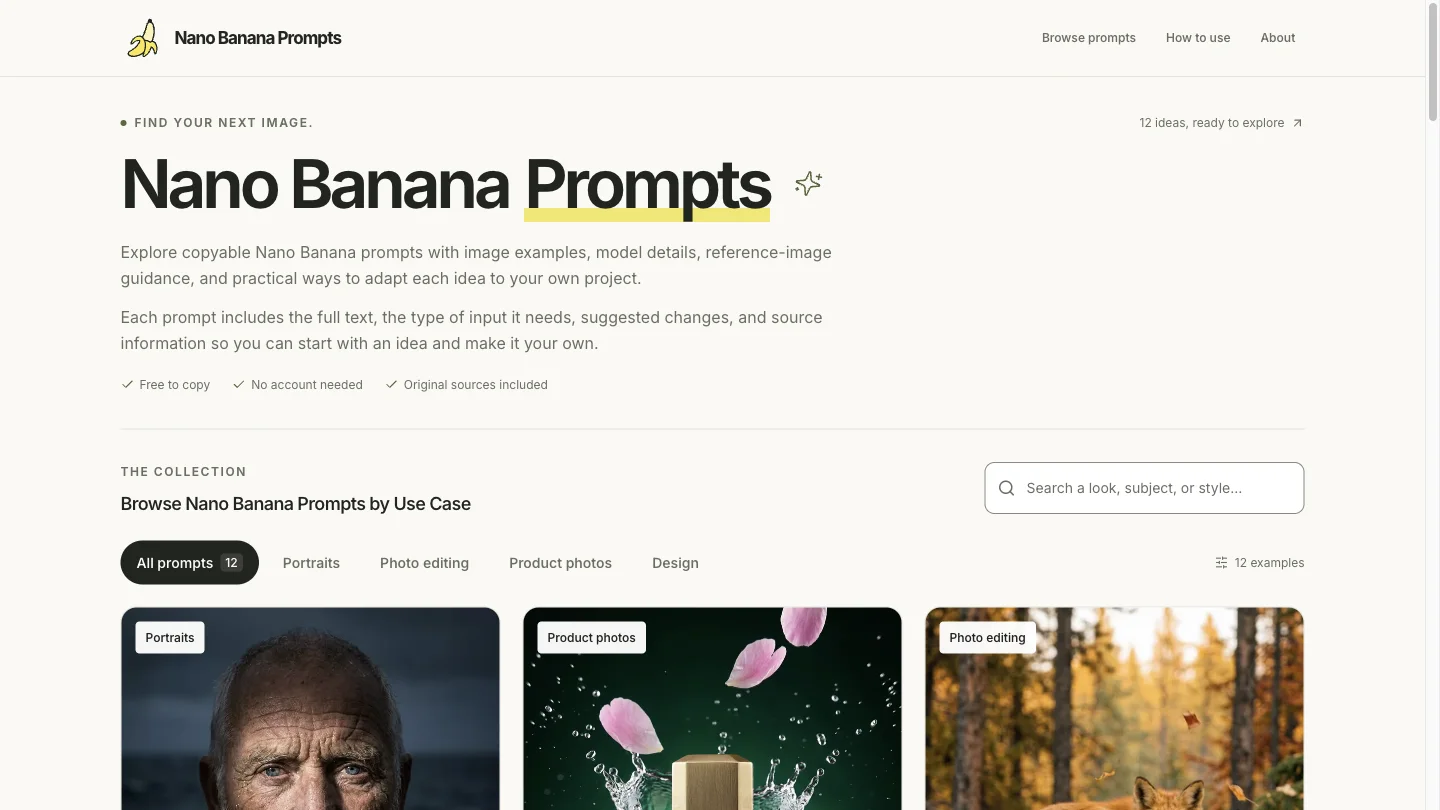
Nano Banana Prompts is a visual prompt library for people who want to create or edit images with Nano Banana and related Gemini image models. It provides a starting point for an image project: browse an example, read the complete prompt, check the required input, and adapt the idea in a compatible external image tool. The collection is organized around portraits, photo editing, product photos, and design. A search box and category filters help narrow the examples. Each prompt page pairs the source image with complete prompt text, source-reported model information, input guidance, a prompt breakdown, and suggested adaptations. Ideas range from cinematic character portraits and product-photo concepts to seasonal photo edits, miniature scenes, and social media designs. Some prompts start with text alone, while editing examples require a reference image. The inspected seasonal-edit page showed both the original reference and the source result, with instructions for preserving the subject and changing the environment. You can change the subject, lighting, background, composition, or style; the guide recommends adjusting one major detail at a time. The library distinguishes Collected examples from independently recorded tests. The examples we inspected were labeled Collected, with an explicit note that the library had not independently reproduced them. Model names are reported by the source and should not be assumed to be official API identifiers. A copied prompt is a starting point, and results can vary with the model, settings, and reference image. Browsing and copying published prompts are free and do not require an account. Image generation happens in the external tool you choose, with its own pricing, limits, account requirements, and terms. Nano Banana Prompts is an independent resource and is not affiliated with or endorsed by Google.
Why we list it
Included as usable reference content after checking the public collection, searching for fisherman, filtering Photo editing, and comparing a copied prompt with its complete detail-page text. Both a text-only portrait and a reference-image edit were inspected. This confirms the library workflow; it does not establish successful image generation, independent reproduction of the examples, or any specific AI coding platform.
Who it’s for
AI image beginners, designers, content creators, photographers, marketers, and small brands looking for visual references and reusable prompt structures for portraits, photo edits, product concepts, and creative designs.
Availability & access
- Account
- No account required
- Download
- No download required
- Browser use
- Works in a browser
- Mobile support
- Limited support
No account or installation was needed to browse, search, filter, open prompt details, or copy a prompt. A 390×844 browser viewport was checked for layout only; touch interactions and a physical mobile device were not tested. Image generation takes place externally and may require an account or payment. The Gemini link opens that service without prefilling or generating an image. No reference image was uploaded and no image-generation session was run during this inspection.
What we found
A visual collection that connects each complete prompt with an example image, input requirements, editorial breakdowns, and adaptation ideas, while identifying collected examples separately from independently recorded tests.
On November 24, 2026, browsed the public library without signing in. Its homepage displayed 12 examples. Searching fisherman returned Dramatic fisherman portrait; the Photo editing filter returned three examples. Copied the fisherman prompt from its card and pasted it into the search input: all 269 characters matched the complete prompt on its detail page. Inspected that text-only portrait, the Change a photo’s season reference-image example, the guide, About, and Terms. The inspected examples were Collected and explicitly not independently reproduced by the library. Also checked a 390×844 browser layout. No external image generation, reference upload, model compatibility test, payment, account flow, or physical-device test was performed.
How to use Nano Banana Prompts
- 1Browse the collection by use case, or narrow it with search and a category filter.
- 2Open an example to inspect its full image and complete prompt.
- 3Check the source-reported model and whether the prompt needs a reference image.
- 4Copy the prompt into a compatible external image-generation or editing tool, and provide the required reference image there.
- 5Adapt the subject, setting, lighting, background, composition, or style to your project.
- 6Generate in the external tool, inspect the result, and adjust one major detail at a time. External generation was not tested for this listing.
Key features
- Visual examples organized into Portraits, Photo editing, Product photos, and Design.
- Collection search and category filters.
- Complete prompts available to copy from cards and detail pages.
- Text-only and reference-image input labels, with input guidance on detail pages.
- Reference and result images on the inspected photo-editing example.
- Prompt breakdowns and suggestions for adapting the subject, lighting, background, or composition.
- Creator attribution, source-reported model information, and Collected status labels.
- A practical guide and external Gemini links for continuing the workflow.
Pros & cons
Pros
- +The inspected collection and complete prompts were accessible and copyable without an account or app installation.
- +Examples and input labels help distinguish text-only generation from reference-image editing.
- +Prompt breakdowns and adaptation suggestions provide a starting point beyond the raw prompt text.
Cons
- −Image generation requires an external tool with its own models, accounts, pricing, and usage limits.
- −Collected examples have not been independently reproduced by the library; copying a prompt does not guarantee the same result.
- −Source-reported model names and provider identifiers may need checking in the image tool you choose.
FAQ
What is Nano Banana Prompts?
Nano Banana Prompts is a visual library of copyable prompts and image examples for Nano Banana and related Gemini image models. It includes portraits, photo edits, product photos, and creative designs, with complete prompt text and input guidance.
Are the prompts free, and do I need an account?
Published prompts can be browsed and copied for free without an account. Image generation happens in the external tool you choose, which may have separate pricing, account requirements, usage limits, and terms.
Does Nano Banana Prompts generate images directly?
The site focuses on browsing, understanding, copying, and adapting prompts. Image generation happens in an external tool. The inspected Gemini links open Gemini; they do not prefill a prompt or generate an image for you.
Do I need a reference image?
It depends on the prompt. Text-only examples start from a written description, while editing examples show the reference-image count and input guidance. Check the individual page and provide any required image in your chosen external tool.
Can I change the prompts?
Yes. Detail pages provide suggestions for changing the subject, setting, background, lighting, composition, or style. Keep the parts that matter to your project and change one major detail at a time so you can assess its effect.
Are all prompts independently tested?
No. Collected means the library has organized a prompt and its credited source example, without independently reproducing it. The guide reserves Tested for a recorded test by the site. The examples inspected for this listing were Collected; SoFast tested browsing and copying, not image generation.
Can I use the prompts with Gemini, and will the result match?
Use a tool that supports the intended image model and required inputs. The site provides Gemini links, but model names and provider IDs are source-reported and may differ from official API identifiers. Model versions, settings, reference images, and prompt changes can affect the result; an identical image is not guaranteed.
Is Nano Banana Prompts an official Google product?
No. Nano Banana Prompts describes itself as an independent resource and is not affiliated with or endorsed by Google or Gemini.
Similar apps
Separate products in the same categories, selected by SoFast.
Upload an image, select a colour and view the tool’s closest RAL reference with a code, name and RGB values.
Also in Content Creation
An AI-assisted presentation builder for generating slides, scripts, narration, and a slideshow experience from a topic.
Also in Content Creation
Create synchronized lyrics by loading audio or video, entering text, assigning timestamps and exporting an LRC, TXT or SRT file.
Also in Content Creation

Restyle, restore, colorize, or rework existing photos with AI presets and prompts that aim to preserve recognizable faces and product details.
Also in Content Creation
Sources
- nanobananaprompts.tools · Observed 2026-11-24
- nanobananaprompts.tools · Observed 2026-11-24
- nanobananaprompts.tools · Observed 2026-11-24
- nanobananaprompts.tools · Observed 2026-11-24
- nanobananaprompts.tools · Observed 2026-11-24
SoFast is an independent directory. Product information is based on publicly available information and may change. Each product is operated by its respective owner. Visit the original website for the latest details.