
LRC Creator
Create synchronized lyrics by loading audio or video, entering text, assigning timestamps and exporting an LRC, TXT or SRT file.
Page reachable · Last checked: 2026-11-15 · Hands-on check
About LRC Creator
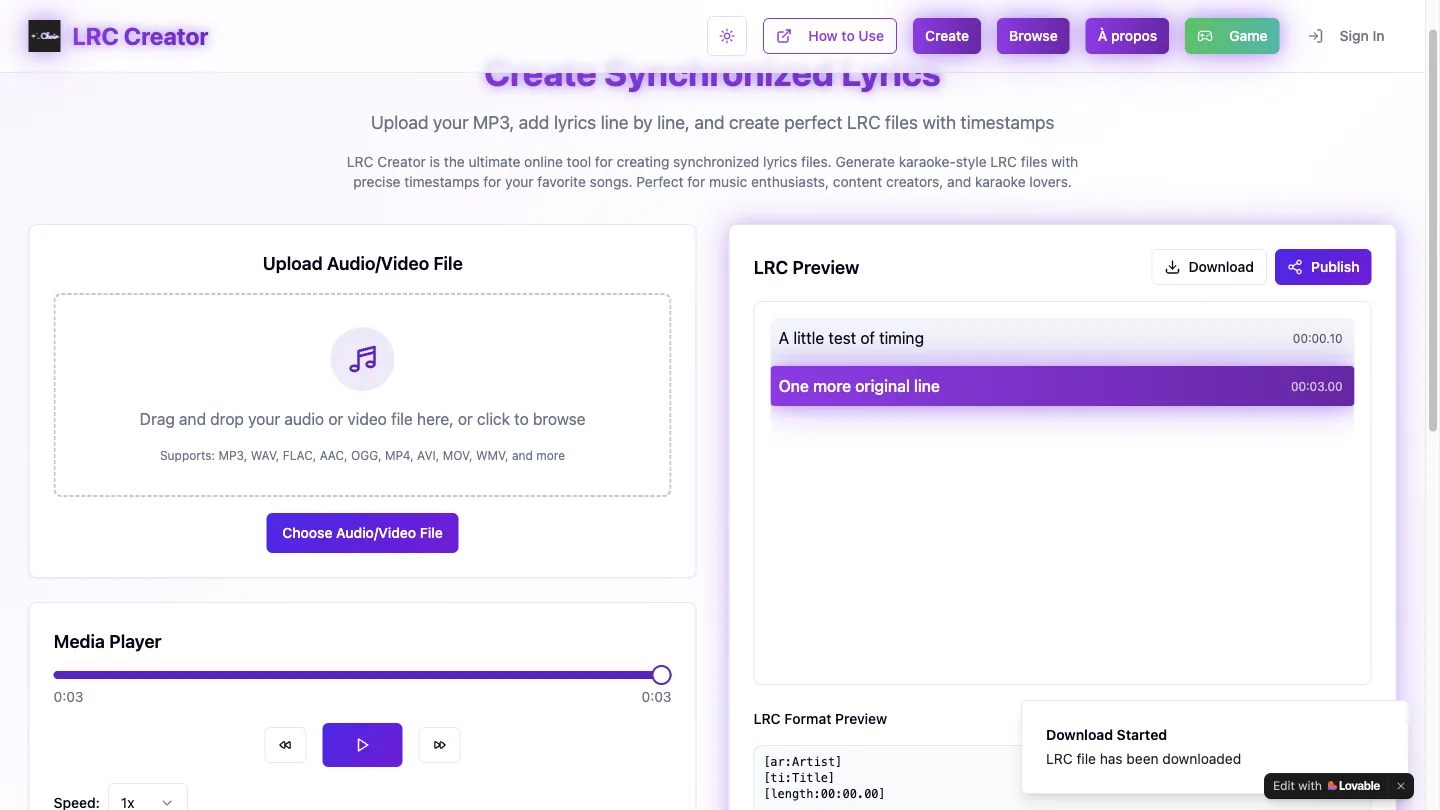
LRC Creator is an online LRC generator for turning supplied lyrics into a timed text file. The editor combines a media player, a line-by-line lyrics workspace and a live LRC preview. It is designed for people preparing karaoke-style lyrics or timed text to accompany audio they already have. The workflow is manual. Load an audio or video file, paste lyrics with one line per entry, and assign timestamps as you move through the media. The page lists several input formats, including MP3 and WAV. A download dialog offers LRC, TXT and SRT output, although only WAV input and LRC export were tested here. This is not evidence of automatic speech recognition or automatic lyric transcription. Our test used a synthetic three-second WAV and two original text lines. We assigned timestamps at 00:00.10 and 00:03.00 and downloaded an LRC file without signing in. Both lines appeared in the exported file. The export also appended a promotional line, Abonne-toi, and retained placeholder artist, title and duration metadata. Those details make file review part of the workflow. Check timestamps, metadata and any additional lines before distributing a result or using it with a media player. LRC Creator offers a compact editing loop, but the observed export should not be treated as a finished, automatically cleaned subtitle file. Public publishing, other export formats and mobile use were not tested.
Why we list it
Included after a real WAV-to-LRC editing and download test. The observed promotional footer and placeholder metadata are disclosed as export limitations.
Who it’s for
Musicians, karaoke enthusiasts and creators who already have text and want to time it manually against their own media.
Availability & access
- Account
- No account required
- Download
- No download required
- Browser use
- Works in a browser
The official title advertises a free online LRC generator. Loading the synthetic WAV, timing text and downloading LRC required no sign-in, installation or payment in our desktop test. Publishing and other formats were not tested. File handling and retention policies were not independently verified.
What we found
The media player, timestamp controls and raw LRC preview appear in one editor, so the relationship between a lyric line and its exported timestamp is visible.
On November 15, 2026, loaded a synthetic three-second WAV and two original lines, assigned 00:00.10 and 00:03.00 timestamps, and downloaded an LRC via the format dialog. The file contained both lines plus an Abonne-toi footer and placeholder artist/title/duration metadata. No sign-in, installation or payment was needed. Public publishing and TXT/SRT exports were not tested.
How to use LRC Creator
- 1Load an audio or video file you own or have permission to use, and paste one original lyric line per line of text.
- 2Move through the media with the player and assign a timestamp to each line. Review the preview before exporting.
- 3Choose Download, select a format and confirm the download. Inspect metadata and extra lines in the exported file.
Key features
- Audio/video file input and an integrated media player.
- Manual, line-by-line lyric loading and timestamp assignment.
- A live preview of timed lyrics and LRC-format text.
- A download dialog offering LRC, TXT and SRT formats; LRC was tested.
- A separate Publish control and sign-in entry; public publishing was not tested.
Pros & cons
Pros
- +The tested two-line LRC export worked without signing in.
- +The live preview makes the timestamped file structure visible.
Cons
- −Our export appended an Abonne-toi promotional line and retained placeholder title, artist and duration metadata.
- −Only WAV input and LRC export were tested; automatic transcription, publishing, TXT/SRT output and mobile use were not validated.
FAQ
Is LRC Creator an automatic LRC generator?
It is an LRC generator with a manual timing workflow: you provide text and assign timestamps against the media. Our test did not demonstrate automatic transcription or automatic alignment.
Which formats can it export?
The download dialog offers LRC, TXT and SRT. We successfully downloaded LRC; the other formats were not tested.
Do I need an account to make an LRC file?
Our test loaded a WAV, timed two lines and downloaded an LRC without signing in. Publishing is a separate feature and was not tested.
Does the exported LRC need editing?
Yes, inspect it before use. Our test file contained both timed lines, an extra Abonne-toi promotional line and placeholder artist, title and duration metadata.
Similar apps
Separate products in the same categories, selected by SoFast.
Upload an image, select a colour and view the tool’s closest RAL reference with a code, name and RGB values.
Also in Content Creation
An AI-assisted presentation builder for generating slides, scripts, narration, and a slideshow experience from a topic.
Also in Content Creation

Restyle, restore, colorize, or rework existing photos with AI presets and prompts that aim to preserve recognizable faces and product details.
Also in Content Creation

Remove an image background in your browser, compare the cutout and download a transparent PNG; preview colours do not flatten the main export.
Also in Creative Media
Sources
- lrc.lovable.app · Observed 2026-11-15
SoFast is an independent directory. Product information is based on publicly available information and may change. Each product is operated by its respective owner. Visit the original website for the latest details.