

AI Toolkits
Browse AI tools for writing, images, video, voice, subtitles and social content, with profiles covering uses, pricing, limits and source notes.
Page reachable · Last checked: 2026-11-15 · Hands-on check
About AI Toolkits
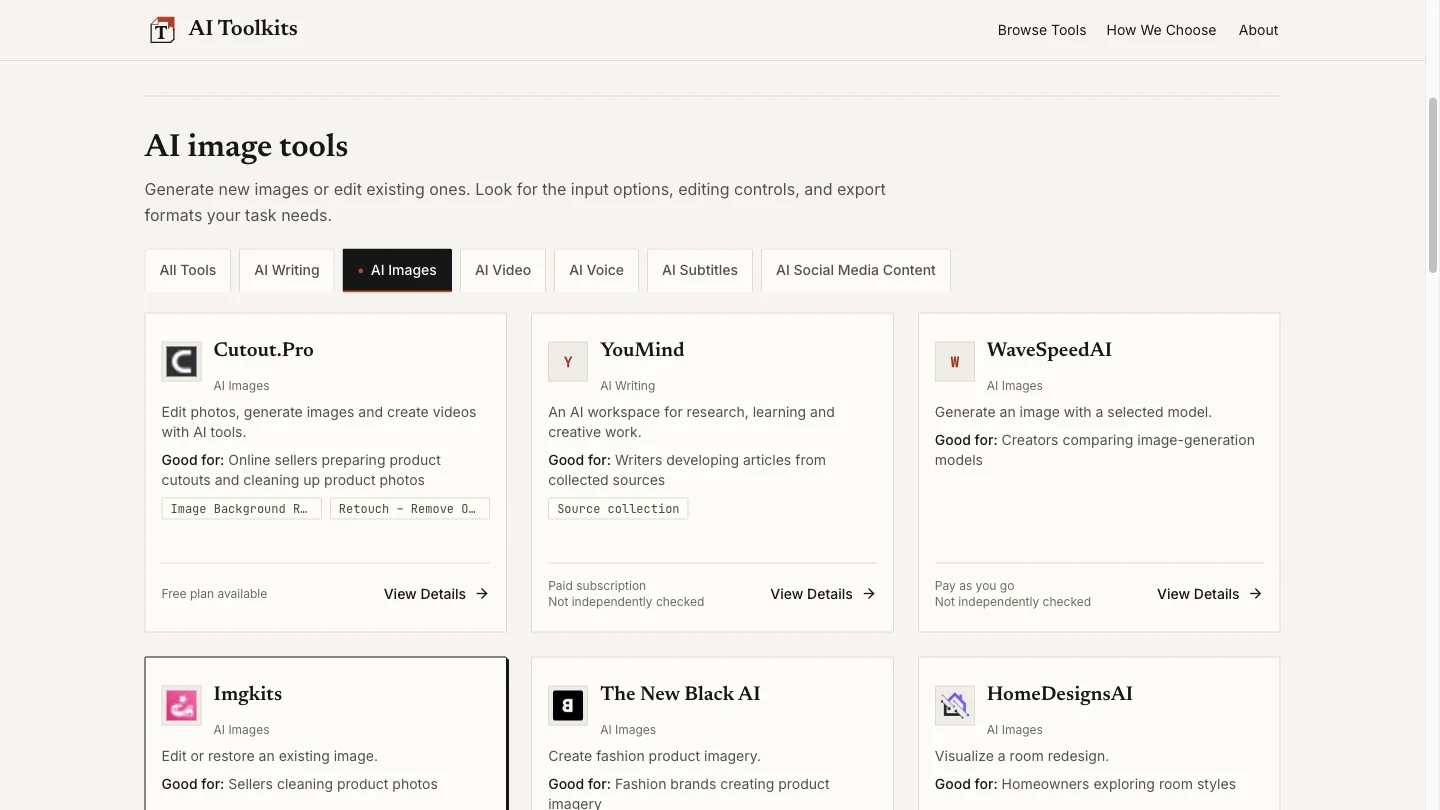
AI Toolkits is a curated AI tools directory for creative and content work. Its categories cover writing, images, video, voice, subtitles and social media content. You can browse by task, read a product profile and follow the provider’s website link when you want to try a service. The directory itself does not generate those images, videos or written outputs. Product cards can show what a tool does, who it may suit and its pricing model. Longer profiles add workflow explanations, restrictions and source notes. This helps with tool discovery when you know the job to accomplish but do not yet have a product shortlist. Detail and verification status vary between entries. We selected AI Images in the public directory and opened the Cutout.Pro profile from a card. Category navigation and profile access worked without an account, software installation or payment. The inspected profile contained a background-removal walkthrough, input requirements, pricing and credit explanations, limitations, related products and official source links. Its update section explicitly said no hands-on test had been performed. We read that profile; we did not use Cutout.Pro or independently validate its product claims. The About page describes editorial selection around a clear task, intended audience, cost and practical restrictions. It says official information and hands-on findings are labelled separately, with unverified details identified. That is the directory’s stated policy, rather than our certification that every listing is current or independently tested. Public directory browsing is separate from buying or accessing a listed product. Each provider controls its accounts, subscriptions, credits, processing and privacy terms. Confirm the current provider information before committing to a tool. The directory’s own privacy policy describes hosting, analytics and first-party interaction records; browsing without an account does not imply no tracking or universal data-retention guarantees. Our check covered one category and one detailed profile, not every entry or the site’s backend.
Why we list it
Included as a usable reference directory after testing category navigation and reading a detailed profile. No third-party content-generation service, purchase, performance claim or complete catalogue accuracy was independently validated.
Who it’s for
Content creators, freelancers, small teams and online sellers building a shortlist of AI services for creative tasks. Useful for comparing descriptions and conditions, with product testing and purchasing still handled separately.
Availability & access
- Account
- No account required
- Download
- No download required
- Browser use
- Works in a browser
The tested public directory, AI Images category and Cutout.Pro profile opened without an account, installed app or payment. The current Terms and Privacy pages say public registration and submissions are unavailable; sign-in is for maintainers. The listing’s Free status refers to directory browsing, not the third-party products it describes. Each provider controls its own account, pricing, processing and privacy terms. The directory’s privacy policy describes hosting/analytics and first-party visit, category and click records, without a single fixed retention period for all records. These statements were not independently audited. No external product, subscription, file upload or payment was tested.
What we found
Profiles aim to combine intended audience, costs, practical limits and evidence scope. The inspected Cutout.Pro entry makes a no-hands-on-test disclosure alongside a sourced walkthrough, helping readers distinguish documentation from performance testing.
On November 15, 2026, browsed the public directory, selected AI Images, observed the category heading, URL and filtered product links, then opened the Cutout.Pro profile from a card. Read its pricing, walkthrough, limitations, source/update links and explicit no-hands-on-test disclosure. The Visit Website link pointed to Cutout.Pro; it was not clicked. No account, installation or payment was needed for these directory actions. This is a directory-navigation check, not a test of Cutout.Pro or other listed services, their prices, output quality, privacy, every listing, or mobile operation.
How to use AI Toolkits
- 1Choose the task category closest to your work, such as AI Images or AI Writing.
- 2Read a card’s purpose, intended audience and pricing label, then open its product profile.
- 3Compare features, restrictions, source links and check dates. Distinguish official statements from documented hands-on tests.
- 4Follow the provider link when you want to evaluate that service, then confirm its own current prices, account requirements and privacy terms.
Key features
- Task-based categories for AI writing, images, video, voice, subtitles and social content.
- Category filtering with a matching heading and URL; AI Images navigation was tested.
- Cards with audience guidance and pricing-model labels; some display Not independently checked.
- Detailed profiles can include features, workflows, pricing notes and practical limits; inspected on Cutout.Pro.
- Source/update sections and explicit test-scope statements; the inspected profile disclosed no hands-on test.
- Links to original providers; the Cutout.Pro destination was inspected without visiting or using the provider.
- Published selection standards and an email route for corrections; correspondence was not tested.
Pros & cons
Pros
- +The tested directory category and product profile were accessible without an account, installation or payment.
- +The inspected profile brought workflow, cost, limitation and source information together.
- +Its explicit no-hands-on-test statement distinguishes documented information from tested output.
Cons
- −Only one category and one profile were checked; the complete catalogue and editorial process were not audited.
- −Provider plans and limits can change, and a listed description does not establish output quality.
- −Third-party subscriptions, access and data handling remain separate; directory browsing does not provide an all-in-one AI service.
FAQ
What is AI Toolkits?
It is a curated directory for finding AI products used in writing, images, video, voice, subtitles and social content. Users browse categories and profiles, then visit the original providers to use their services.
Does it generate content or include access to every listed AI tool?
No such shared generator or subscription was established. The inspected site is a directory with provider links. Content generation, product access, accounts and payments are handled by each third-party service.
Is browsing free, and are all listed tools free?
Our category and profile browsing needed no payment or account. This is separate from provider pricing: cards include free-plan, subscription and pay-as-you-go labels. Confirm each provider’s current conditions before paying.
Has every listed tool been independently tested?
The About page says official information and hands-on findings are separated. The Cutout.Pro profile we read explicitly stated no hands-on test was performed. Our directory-navigation check does not validate that tool or the complete catalogue.
What information can a product profile include?
The inspected Cutout.Pro profile included features, audience, a workflow, pricing/credit notes, limitations, source links and an update note. Detail varies by listing, and we did not independently confirm those third-party specifications.
Can I submit a tool or report a correction?
Current Terms and Privacy pages say public submissions and registration are unavailable. The About page provides an email route for corrections and asks for the product, the detail to fix and a source if available. We did not send a message.
Similar apps
Separate products in the same categories, selected by SoFast.

Remove an image background in your browser, compare the cutout and download a transparent PNG; preview colours do not flatten the main export.
Also in Creative Media
Upload an image, select a colour and view the tool’s closest RAL reference with a code, name and RGB values.
Also in Creative Media

Create AI videos and images for YouTube Shorts, UGC-style ads and social content in one browser workspace.
Also in Creative Media
An official movie website for The Dresden Sun with film information, trailer, watch links, music, merch, and audience updates.
Also in Creative Media
Sources
- aitoolkits.io · Observed 2026-11-15
- aitoolkits.io · Observed 2026-11-15
- aitoolkits.io · Observed 2026-11-15
- aitoolkits.io · Observed 2026-11-15
SoFast is an independent directory. Product information is based on publicly available information and may change. Each product is operated by its respective owner. Visit the original website for the latest details.