

Favicon Generator
Create website icons from text or an existing image, preview them and download ICO, PNG and manifest assets with installation guidance.
Page reachable · Last checked: 2026-11-15 · Hands-on check
About Favicon Generator
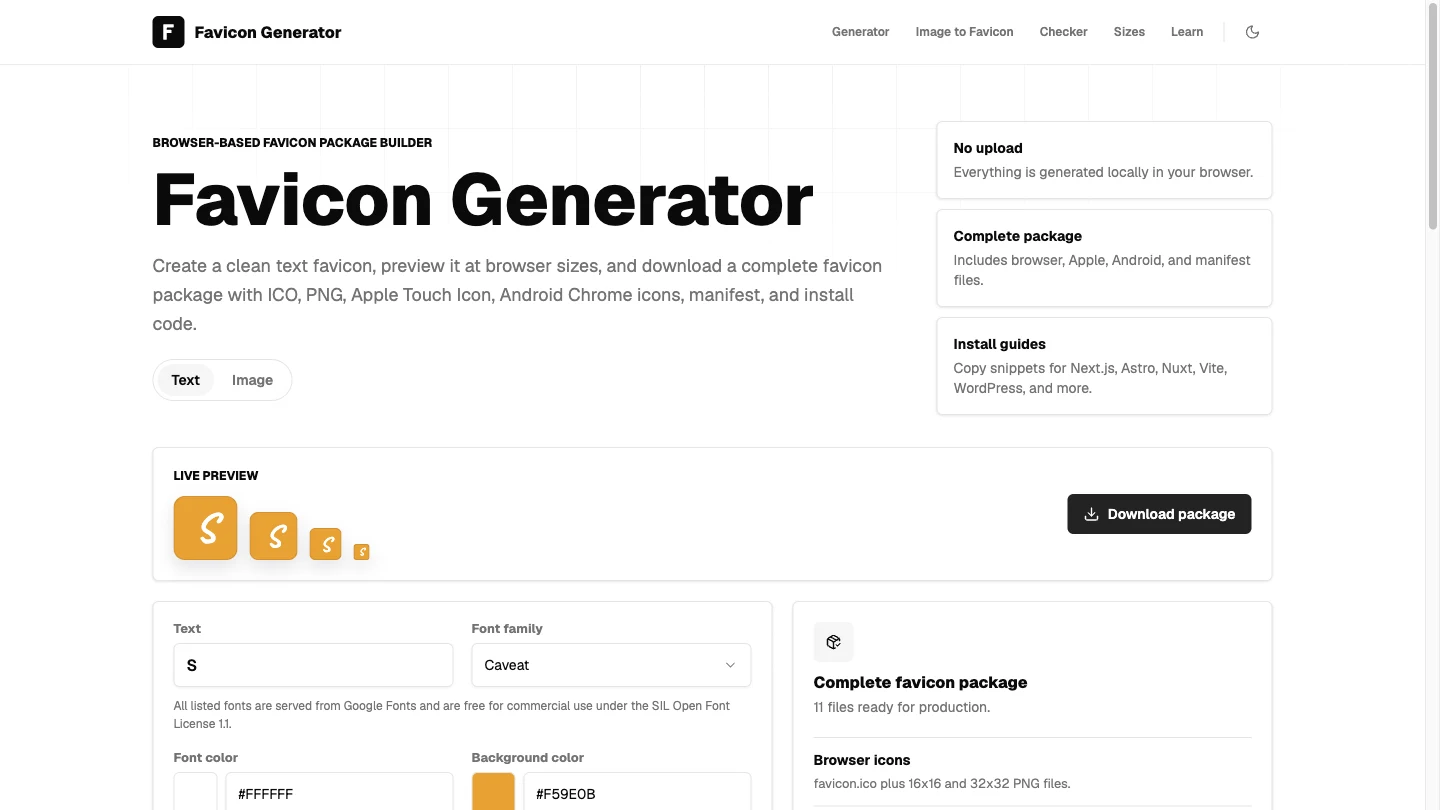
Favicon Generator at faviconicon.org creates website-icon packages from text or existing artwork. The text workflow provides font and colour controls with small-size previews. The image workflow accepts provider-listed PNG, JPG, WebP and SVG input up to 5 MB, with fit, background and shape options. These are icon-customisation and conversion tools, not AI artwork generation. We tested a text icon using S with default settings, then converted a self-created 512×512 PNG through the image page. Both generic ZIP downloads worked without an account, installed software or payment. Each archive contained five PNGs at 16, 32, 180, 192 and 512 pixels; favicon.ico embedded 16, 32 and 48-pixel images. The manifests parsed successfully, and install HTML, a README and source/font notes were included. The UI advertised 11 files, while the two downloaded packages actually held 10. Installation guidance and coding-assistant prompts are offered for common stacks, including HTML, Next.js, React/Vite, Astro, Nuxt, SvelteKit and WordPress. Those materials help describe project changes; the website did not edit or deploy our project. We did not validate stack-specific archives, clipboard prompts or framework integration. A manifest and icon files alone do not establish a complete installable or offline-capable app. The provider says icon generation runs in the browser and selected image inputs are not uploaded for processing. Its policy also allows analytics, and fonts may require network requests. We did not audit traffic, backend storage or licensing. Review source-art rights and the supplied font notes rather than assuming every uploaded logo is cleared for use. Small icons need simple, legible artwork. Inspect the 16-pixel result and verify asset paths after installation. Our test covered one text icon and one PNG, not every image format, SVG output, mobile device, file-size boundary or search-engine display.
Why we list it
Included after text and PNG archive downloads, CRC checks, image-size inspection and manifest parsing. The listing distinguishes inspected files from untested framework instructions, privacy and licensing statements.
Who it’s for
Developers, indie makers and designers preparing browser and mobile-home-screen icon assets for a website. It is useful for simple text marks or adapting existing artwork, with manual project integration still required.
Availability & access
- Account
- No account required
- Download
- No download required
- Browser use
- Works in a browser
Text and PNG workflows completed without an account, installed app or payment. ZIP assets must still be downloaded and installed in your project; no installed app is needed to run the generator. The image page lists a 5 MB limit; other formats and boundaries were not tested. The provider describes browser-local generation without uploading icon content; analytics and font requests are separate. No network/storage audit was performed. Terms permit generated-file use subject to source-art rights and font notes; licences were not independently evaluated. No automatic installation, deployment, complete PWA or search-result display guarantee was established.
What we found
Two workflows produce multi-size icon packages with installation guidance rather than only a single ICO. We inspected both generic archives and recorded the mismatch between advertised and actual file counts.
On November 15, 2026, changed the homepage text to S and downloaded the generic favicon ZIP. Selected a self-created 512×512 PNG on the image-conversion page and downloaded its generic ZIP. Both archives passed CRC checks and contained 10 files, five PNG sizes (16, 32, 180, 192, 512), an ICO with 16/32/48 embedded sizes, parseable web manifest, install HTML and README/source or font notes. UI advertised 11 files, but both archives held 10. No account, installed app or payment was needed. Stack-specific ZIPs, installation, other image formats, size boundaries, checker, mobile and privacy were not audited.
How to use Favicon Generator
- 1Choose text creation on the homepage or open Image to Favicon for existing artwork.
- 2Adjust the text design, or choose a supported image and review its fit and small-size previews.
- 3Download the package and inspect the icons, manifest and notes; archive contents can differ from displayed counts.
- 4Install the files using guidance appropriate to your project, then verify the actual asset URLs. This installation step was not tested.
Key features
- Text favicon editor with font, colour and live preview controls; an S icon was downloaded.
- Image-to-favicon workflow with fit/background/shape controls; a self-created PNG was converted.
- ICO export containing 16×16, 32×32 and 48×48 images, verified in both generic archives.
- Five PNG sizes: 16, 32, 180, 192 and 512 pixels, verified in both archives.
- Web manifest, install HTML, README and font/source notes in the tested packages.
- Framework-specific guidance and coding-assistant installation prompts are presented; installation was not tested.
Pros & cons
Pros
- +Text and image package downloads worked without login, installation or payment.
- +The tested ICO files included three sizes, alongside five correctly sized PNGs.
- +The generic packages included parseable manifests and basic installation documentation.
Cons
- −The interface advertised 11 files, but both tested generic archives contained 10.
- −Only one text setting and one PNG were tested; stack-specific ZIPs, other input formats and real project installation were not verified.
- −Local processing and font-licence statements are provider claims, not independent network or legal audits.
FAQ
Can I create a favicon without a logo?
The text workflow creates an icon from text with font and colour controls. We changed the default text to S and successfully downloaded a generic package.
Which files were in the tested ZIPs?
Each contained 10 files: five PNG sizes, a multi-size ICO, site.webmanifest, install HTML, a README and font/source notes. ICO sizes were 16/32/48; PNG sizes were 16/32/180/192/512. The visible 11-file claim did not match the archives.
Which image formats can I convert?
The page lists PNG, JPG, WebP and SVG up to 5 MB. We tested only a self-created 512×512 PNG. SVG input does not establish that the package includes an SVG favicon.
Are my images uploaded?
The provider says generation and image conversion run locally in the browser. We did not audit network traffic or backend storage; fonts and analytics can still involve network requests.
Does it install the icons or use AI to design them?
The tested workflows customise text or convert artwork and download files. Installation code and coding-assistant prompts are guidance, not automatic project changes or AI artwork generation. We did not install the files in a project.
Can I use it with different web frameworks?
The site offers guidance for HTML, Next.js, React/Vite, Astro, Nuxt, SvelteKit and WordPress. Generic packages were inspected; stack-specific archives and framework instructions were not validated.
Similar apps
Separate products in the same categories, selected by SoFast.
Also in Builder Dev Tools
A developer landing page for Claude Flow, presenting multi-agent AI orchestration, MCP tools, self-learning coordination, and Claude Code workflows.
Also in Builder Dev Tools
Sources
- faviconicon.org · Observed 2026-11-15
- faviconicon.org · Observed 2026-11-15
- faviconicon.org · Observed 2026-11-15
SoFast is an independent directory. Product information is based on publicly available information and may change. Each product is operated by its respective owner. Visit the original website for the latest details.