

AI Prompt Tools
Generate prompts from task descriptions or revise existing instructions, add requirements, then review and copy the result into your AI tool.
Page reachable · Last checked: 2026-11-15 · Hands-on check
About AI Prompt Tools
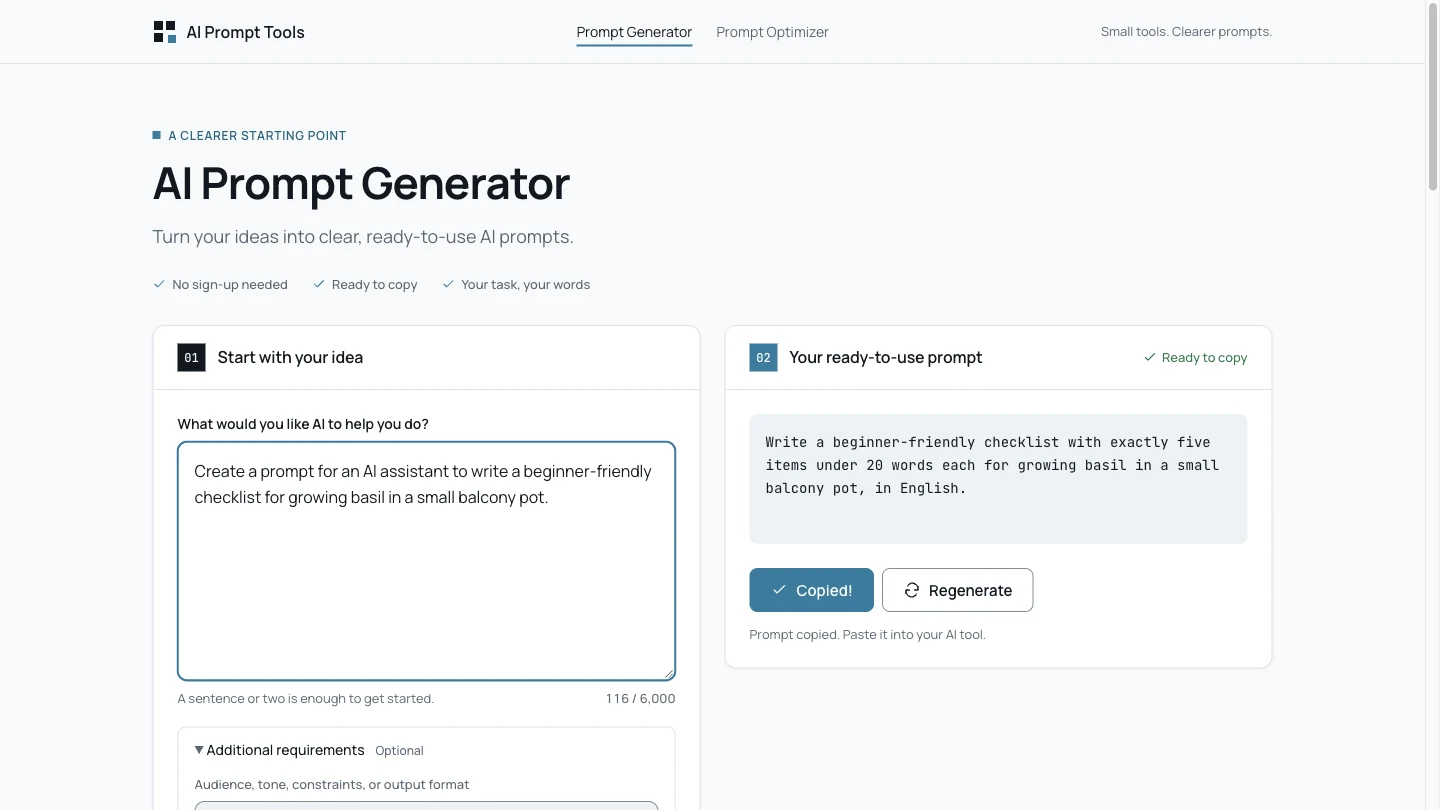
AI Prompt Tools provides an AI prompt generator and an AI prompt optimizer in a browser. The generator starts from a description of what you want an AI system to do. The optimizer starts from an existing instruction and aims to make it clearer while retaining its purpose. These are writing aids for prompts, rather than a prompt library or an application that carries out the final task. Both forms offer a main input of up to 6,000 characters and an optional 1,500-character requirements field. You can specify an audience, output format, tone or constraint before submitting. Results can be reviewed and copied into another AI application. The site presents access as free without an account, subject to fair-use controls and shared capacity; it does not promise unlimited requests. We submitted one task about writing a balcony-basil checklist and one existing prompt about explaining recursion. Both workflows returned prompt text, and Copy produced matching text when pasted into the input. Neither required login, installation or payment. This was a two-example functional check, not a benchmark of improvement in ChatGPT, Claude, Gemini or another target model. The examples also show why review matters. The generator kept the requested checklist length and word limit but did not restate a no-brand-name requirement. The optimizer retained three short bullet points and no code, but did not restate the beginner audience or English-output requirement. Check every important constraint, replace placeholders and restore missing context before reuse. The current privacy policy identifies server-side Cloudflare Workers AI processing. It says the application does not maintain a prompt input/output database or history and does not intentionally include complete prompts in diagnostics or analytics. Technical limit metadata, cookies and infrastructure processing are separate. We did not audit those claims: this is not a fully local workflow or a guarantee that nothing is retained anywhere.
Why we list it
Included after successful Generator and Optimizer requests and clipboard checks. The listing records omitted requirements in the actual examples and distinguishes server-side processing from the provider’s narrower no-prompt-history statement.
Who it’s for
People drafting reusable instructions for writing, learning, coding or creative AI workflows, especially when they can review the output against a clear task and constraints. It is less suitable as an unchecked replacement for precise instructions.
Availability & access
- Account
- No account required
- Download
- No download required
- Browser use
- Works in a browser
One Generator request and one Optimizer request worked in a desktop browser without login, installed software or payment. Both forms list 6,000-character main inputs and 1,500-character optional requirements; boundary submissions and usage-limit thresholds were not tested. The current policy says requests go through the server to Cloudflare Workers AI. It states the application does not create a prompt database/history or intentionally put complete prompts into diagnostics or analytics. Cookies and technical rate-limit metadata are separate, as are infrastructure/provider practices. We did not audit network traffic, backend storage or provider retention. Results can be lost when leaving or refreshing; keep a copy you need.
What we found
Two focused workflows separate starting from a task description and revising an existing prompt, with an optional requirements field and copyable results. The optimizer also shows a brief change explanation.
On November 15, 2026, submitted one self-written balcony-basil task with extra requirements to the Generator and one beginner-recursion prompt to the Optimizer. Both returned prompt text without login, installation or payment; both Copy actions produced matching pasted text. The Optimizer copy was confirmed after waiting for its Copied status. Some constraints were retained, while the Generator did not restate the no-brand requirement and the Optimizer did not restate beginner audience or English-output requirements. Inspected 6000/1500-character field limits. No maximum-length submission, rate-limit exhaustion, downstream AI benchmark, mobile test or backend/privacy audit was performed.
How to use AI Prompt Tools
- 1Use the homepage Generator to describe a task, or open Prompt Optimizer for an existing prompt.
- 2Add audience, format and constraints in Additional requirements. Check the displayed input limits.
- 3Submit once, wait for the result, then compare it with your original task and every requirement.
- 4Restore omitted constraints and fill in accurate context or placeholders. Use Copy Prompt and confirm the copy status before pasting.
- 5Try the reviewed prompt in your intended AI application; the tool writes instructions rather than completing that final task.
Key features
- AI Prompt Generator for a task description and AI Prompt Optimizer for existing instructions; one request to each was tested.
- Main input up to 6,000 characters and optional requirements up to 1,500 in both forms; inspected, not boundary-tested.
- Optional audience, tone, format and constraint guidance before generation.
- Copy Prompt controls; matching clipboard paste was verified in both tested workflows.
- Optimizer output includes an improved prompt and a short What changed explanation; observed in the test.
- Regenerate controls are present; additional generations were not tested.
- Free no-account access, subject to the provider’s fair-use controls and shared capacity.
Pros & cons
Pros
- +Both tested public workflows returned copyable prompt text without an account or payment.
- +The separate task and requirements fields make the desired output conditions explicit before submission.
- +The Optimizer displayed both the revised instruction and a short change explanation.
Cons
- −Both examples failed to restate some requested conditions; important constraints need manual comparison and correction.
- −Only one request per workflow was tested, without checking the result in a downstream AI model.
- −Server processing and fair-use limits apply; backend retention, capacity and exact request quotas were not independently verified.
FAQ
What is the difference between the generator and optimizer?
The Generator writes a prompt from a task description. The Optimizer starts from an existing prompt and aims to clarify it while preserving the goal. Both provide optional requirements and copyable output; neither executes the final target task.
Is AI Prompt Tools free and account-free?
The public site describes both tools as free, without an account, subject to fair-use and shared-capacity limits. Our one request per tool and copy checks needed no login, installation or payment. Unlimited availability and exact quotas were not verified.
What are the input limits?
Both forms showed a 6,000-character main input and 1,500-character optional requirements field. We checked the visible counters and DOM limits but did not submit maximum-length or oversized inputs.
Does optimization preserve every constraint or guarantee better results?
No guarantee was established. Our Generator example did not restate a no-brand condition, and the Optimizer did not restate beginner audience or English-output requirements. Other constraints were retained. Compare the result with your full request before using it.
Are my prompts processed locally or saved in a history?
The current policy identifies server-side Cloudflare Workers AI processing. It says the application does not maintain a prompt input/output database or history, but technical limit metadata and infrastructure policies are separate. This was not independently audited and is not a blanket zero-retention promise.
Can I use results with ChatGPT, Claude or Gemini?
The results are prompt text you can review and adapt for your intended AI tool. We verified copying and pasting inside the website, not downstream model performance or compatibility with every model’s syntax. Keep your own copy because results may be lost after leaving or refreshing.
Similar apps
Separate products in the same categories, selected by SoFast.
A brutalist motivational landing page with age-based countdowns, reality-check prompts, and productivity pressure cues.
Also in Productivity Workflow
Sources
- aiprompt.tools · Observed 2026-11-15
- aiprompt.tools · Observed 2026-11-15
- aiprompt.tools · Observed 2026-11-15
SoFast is an independent directory. Product information is based on publicly available information and may change. Each product is operated by its respective owner. Visit the original website for the latest details.